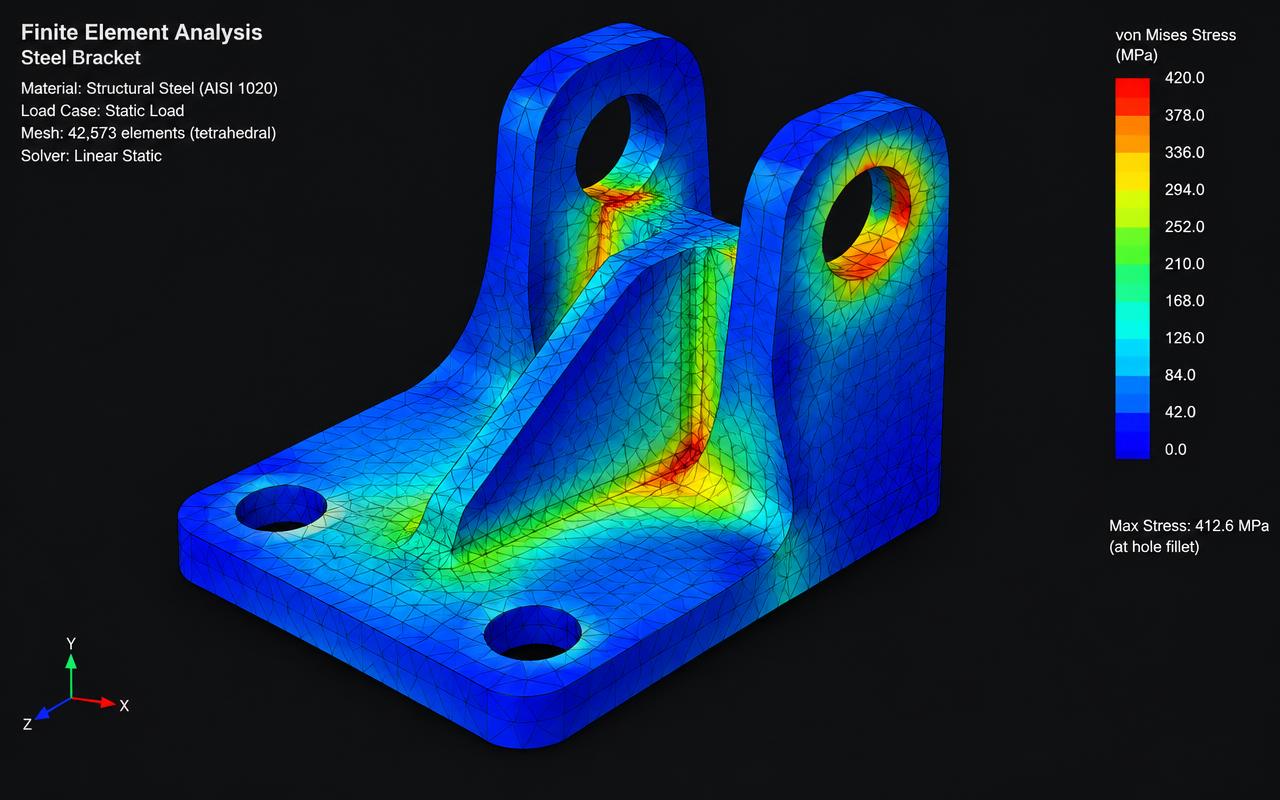
Software
ANSYS Mechanical
ANSYS Mechanical Enterprise for advanced linear and non-linear FEA.
Quick answer
Structural Engineering Services supports ANSYS Mechanical projects worldwide with ansys fea services, fea analysis services, buckling analysis, nozzle load & local stress fea — delivered by senior engineers on licensed software to international codes.
- Publisher
- Ansys
- Discipline
- Advanced finite element analysis
- Licensing
- Commercial seats, in-house only
Capability at a glance
Our ANSYS Mechanical bench strength
Every figure below is what we run in production — licensed seats, supported versions and the scale we deliver at, so you can size us against your package before you enquire.
4
Mechanical Enterprise seats
With HPC packs for parallel solves
2021 R1–2024 R2
Versions supported
Models delivered in the release your reviewer runs
12M DOF
Largest solved model
64-core solve on in-house hardware
Div 2 Part 5
Primary assessment route
Plus EN 13445 Annexes and API 579 Levels 2–3
5–10 days
Typical study
Scope, model, convergence study and reviewed report
Deliverables
What we produce in ANSYS Mechanical
We go to ANSYS when the code formula runs out — contact, plasticity, fatigue, buckling and thermal transients. Every model ships with the mesh study and the acceptance criteria that make the result defensible.
Scope your deliverablesLinear & non-linear stress analysis
Large deflection, contact, bolt pretension and material plasticity captured where assuming linear behaviour would be unsafe or uneconomic.
ASME VIII Div 2 Part 5 assessment
Stress linearisation with membrane, bending and peak classification, and protection against plastic collapse, local failure, buckling and cyclic loading.
Fatigue & cyclic life
Elastic and elastic-plastic fatigue to ASME Div 2 Part 5.5 or EN 13445 Annex, with load histogram, cycle counting and damage summation.
Buckling & stability
Eigenvalue buckling plus non-linear collapse with imperfections for shells, stacks, large ducts, silos and vacuum-service equipment.
Thermal & thermal-stress
Steady-state and transient thermal runs coupled to structural solves for jackets, refractory-lined equipment and start-up or shutdown transients.
Mesh study & technical report
Convergence evidence, boundary-condition justification, material data references and acceptance criteria — written so a third-party reviewer can approve it.
Interoperability
ANSYS Mechanical file formats we work with
ANSYS usually takes geometry built elsewhere and sends an answer back to the designer. Keeping geometry clean on the way in is most of the work, so we handle the defeaturing ourselves.
| Format | Direction | How we use it |
|---|---|---|
| STEP / IGES / Parasolid | Both ways | Neutral solid geometry in from any CAD; defeatured analysis geometry back out to the designer. |
| Inventor / SolidWorks / Creo | We import | Native CAD read directly, keeping the parametric link for design-iteration studies. |
| APDL deck (.cdb / .dat / .inp) | Both ways | Scripted model definition for parameterised studies and for clients who re-run in Mechanical APDL. |
| Loads from CAESAR II | We import | Piping end loads applied as real boundary conditions on the nozzle or attachment being assessed. |
| Result archive (.rst / .mechdat) | We deliver | Full solved database delivered so a reviewer can probe any location without re-solving. |
| Word / PDF report | We deliver | Figures, linearisation tables and criteria checks assembled into the submission document. |
| Deformed geometry / STL | We deliver | Distorted shapes and buckling modes exported for fabrication tolerance and inspection discussion. |
Working in a format that is not listed? Send a sample file with your enquiry — we confirm every exchange route before kick-off rather than discovering it at issue.
How we work
Our ANSYS Mechanical workflow
Each stage has a defined input, output and owner, which is what keeps multi-phase packages predictable across time zones.
- 1
Scope & acceptance criteria
We fix the failure modes to be assessed and the exact code clause each result will be judged against before any modelling begins.
- 2
Geometry preparation
Defeaturing, mid-surfacing and symmetry exploitation in SpaceClaim, so the mesh resolves the stress rather than the fillet of an unrelated bolt hole.
- 3
Material & contact definition
True stress-strain curves, temperature-dependent properties, friction and bolt pretension set up from referenced data, not defaults.
- 4
Mesh & convergence study
Quality gateRefined in the regions that govern, with a documented convergence check proving the reported stress is mesh-independent.
- 5
Load steps & solve
Sequenced load steps for bolt-up, pressure, thermal, operating and upset conditions, with solver convergence monitored and reported.
- 6
Post-processing & linearisation
Stress classification lines placed where the code requires, with membrane and bending stresses compared against allowables case by case.
- 7
Report & design feedback
The report states not only pass or fail but the specific geometry change that resolves a failure, with a re-run to confirm it.
One stage is a formal quality gate — work does not move forward until a senior engineer signs it off, which is why revisions after issue stay rare.
Choosing a platform
When ANSYS Mechanical is the right choice
Most enquiries arrive naming a tool. Sometimes it is the right one; sometimes another package in our stack gets you there faster and cheaper. Here is how we decide.
Choose ANSYS Mechanical when
- Geometry or loading that falls outside the scope of code rules — unusual nozzles, intersections, jackets, internals or supports.
- Cyclic service where fatigue life, not static strength, decides the design.
- Non-linear behaviour matters: contact, gasket seating, plasticity, large deflection or post-buckling collapse.
- Fitness-for-service or remaining-life assessment of an existing, damaged or corroded item to API 579 Level 3.
We would use something else when
Still unsure? Send the drawings and the deliverable you need — we will tell you which platform we would run it on, and why, before quoting.
Relevant services
Our ANSYS Mechanical services
ANSYS FEA Services
Running linear, non-linear, thermal and modal analyses on ANSYS Mechanical Enterprise.
ExploreFEA Analysis Services
Simulating complex components to find stresses, deformation and failure risks before fabrication.
ExploreBuckling Analysis
Evaluating linear and non-linear buckling of shells, columns and thin-walled structures.
ExploreNozzle Load & Local Stress FEA
Verifying nozzle junctions and local attachments beyond WRC 107/297 limits.
ExploreDirectory
ANSYS Mechanical work by market
Pick the market your project is built in. Every page sets out the governing codes, units and delivery window we work to there.
8 markets
Start your project
Send your drawings. Get a quote in 24 hours.
Free, no-obligation proposal from a senior engineer.